ArticlesPerformance · Shopify
Sub-second LCP on Shopify: the whole checklist
Largest Contentful Paint is won or lost on the hero image, the fonts, and the apps you forgot you installed. Here's the exact sequence we run on every Shopify theme build.
In brief
- LCP on a Shopify store is almost always the hero image — optimise that one request before anything else.
- Serve the hero as AVIF/WebP via image_tag with real srcset widths, preload it, and mark it fetchpriority="high".
- Self-host and subset fonts, preload only above-fold weights, and always use font-display: swap.
- App embeds are the silent killer: audit them quarterly and defer anything that isn't needed for first paint.
- Lock the result in with a Lighthouse CI budget so regressions fail the build, not the storefront.
Contents
Largest Contentful Paint measures one thing: how long the biggest element in the viewport takes to render. On a Shopify store that element is almost always the hero image, which means LCP is less a mystery to investigate than a checklist to execute. This is the sequence we run on every theme build — it’s how Aster Studio ships a 0.9s LCP on mobile, and none of it requires anything exotic.
Find your LCP element first
Before optimising anything, know what you’re optimising. Lighthouse names the exact node in its Largest Contentful Paint element audit, and the answer is occasionally surprising — a background texture, a slow-loading review widget, a cookie banner that paints late and large.
# Local check against a preview URL (mobile emulation is the default)
npx lighthouse https://your-store.myshopify.com --view

# Or watch a real page in the field via the CrUX API
npx crux-api-util --url https://your-store.com --metric largest_contentful_paint
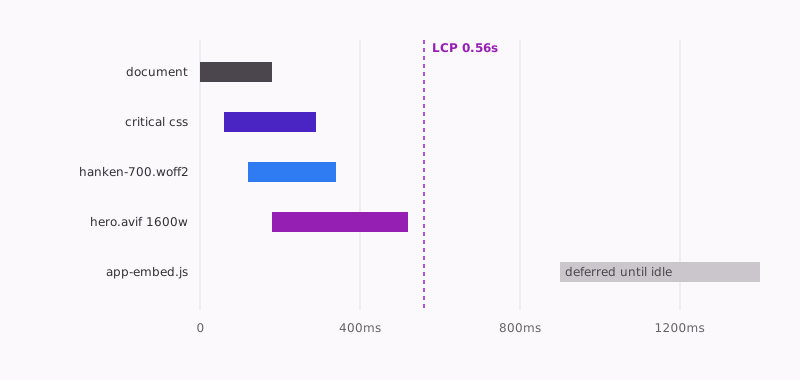
Once you know the element, the waterfall tells you where the time goes. A healthy one looks like this: document, critical CSS, one font, the hero — and everything else politely waiting its turn.
The hero image is the whole game
Shopify’s CDN will resize, re-encode and serve modern formats on request —
but only for the widths you actually ask for. Three attributes do the heavy
lifting: a real srcset, an honest sizes, and fetchpriority="high" so
the browser starts the request before layout settles. Preload it too; on a
section-based theme the hero markup often renders late in the document even
though the image is the first thing a visitor sees.
{{ section.settings.hero_image
  | image_url: width: 1600
  | image_tag:
      widths: '480, 768, 1024, 1600, 2048',
      sizes: '100vw',
      fetchpriority: 'high',
      preload: true,
      alt: section.settings.hero_alt
}}
preload: true makes Shopify emit the preload for you, matched to the
generated srcset — no hand-written <link> tags to fall out of sync. Two
rules keep the rest honest:
| Rule | Why it matters |
|---|---|
| Hero loads eagerly, everything below the fold lazily | loading="lazy" on the hero adds delay; on below-fold images it removes it |
Explicit width/height on every image |
Reserved space means zero layout shift while the image streams in |
Fonts: subset, swap, preload
A web font can’t block paint unless you let it. Self-host, subset to the characters you actually use, and preload only the weights that appear above the fold — for us that’s the 400 body and the 700 display, roughly 13KB each.
<link rel="preload" as="font" type="font/woff2" crossorigin
  href="{{ 'brand-400.woff2' | asset_url }}">
<link rel="preload" as="font" type="font/woff2" crossorigin
  href="{{ 'brand-700.woff2' | asset_url }}">
font-display is not optional
Every @font-face rule gets font-display: swap. Text renders immediately
in the fallback stack and upgrades when the font arrives; a visitor reading
your headline in a system font for 200ms beats one staring at invisible text.
Third-party apps are the silent killer
Theme code gets reviewed; app embeds accumulate. Each one can inject script
and CSS into theme.liquid, and a store running a dozen apps routinely
carries half a megabyte of third-party JavaScript it doesn’t need for first
paint.
We’ve never audited a store and found the theme was the problem. It’s always the apps — and the fix is a spreadsheet, not a rewrite.
Quarterly, list every app embed, ask what breaks if it loads late, and defer accordingly. Anything that isn’t visible above the fold — chat widgets, review carousels, analytics beyond your pageview ping — waits until the browser is idle:
// Load non-critical third parties after first paint, not during it.
const lazyScripts = [
  "https://cdn.example-chat.com/widget.js",
  "https://cdn.example-reviews.com/carousel.js",
];

const load = () =>
  lazyScripts.forEach((src) => {
    const s = document.createElement("script");
    s.src = src;
    s.defer = true;
    document.head.append(s);
  });

"requestIdleCallback" in window
  ? requestIdleCallback(load, { timeout: 4000 })
  : setTimeout(load, 2000);
The Chrome team’s walkthrough of this whole discipline is still the best half-hour on the subject:

Ship it, then keep it shipped
A fast launch decays one app install at a time. The fix is a budget the build enforces — we gate every theme PR on Lighthouse CI, so a regression fails in review rather than in the field.
# .github/workflows — fail the PR if the preview misses budget
npx @lhci/cli autorun \
  --collect.url="$PREVIEW_URL" \
  --assert.assertions.largest-contentful-paint="error;maxNumericValue=2500"
That’s the whole checklist: name the element, win the hero request, keep fonts and apps off the critical path, and automate the regression test. None of it is clever. All of it compounds — which is rather the point.
Questions, answered
What is a good LCP score for a Shopify store?
Under 2.5 seconds at the 75th percentile of real users is Google's 'good' threshold, but well-built themes can land under 1 second on fast connections. We treat 2.5s as the ceiling, not the target.
Does Shopify's CDN handle image optimisation automatically?
Partly. Shopify's CDN resizes and re-encodes images on request and serves modern formats to supporting browsers, but only for the widths you ask for. You still have to request sensible srcset widths, set sizes correctly, and preload the hero — image_tag doesn't do that for you by default.
Do Shopify apps really affect LCP?
Yes, more than most theme code. Every app embed can inject render-blocking script and CSS into theme.liquid. A store with a dozen apps commonly carries 500KB+ of third-party JavaScript; auditing and deferring those is often the single biggest LCP win available.
How do I find my LCP element?
Run Lighthouse in Chrome DevTools and open the 'Largest Contentful Paint element' audit — it names the exact node. On most product and landing pages it's the hero image or the H1; on collection pages it's usually the first product card image.
Sources
- Largest Contentful Paint (LCP) — web.dev
- Optimize Largest Contentful Paint — web.dev
- Shopify theme performance best practices — shopify.dev
- Web Almanac — Performance — almanac.httparchive.org